

Commissioning Software: Create Digital Reports and Handle Acceptance Procedures on the Go
- Define the scope of testing for each system or machine type once, rather than retyping the reports
- Perform on-site commissioning using a tablet, even without network coverage
- Track outstanding issues until final acceptance and submit the report in an audit-proof format
From test planning to acceptance: Fully digital commissioning with Testify
Define the scope of testing for each system once, rather than retyping reports
Anyone who maintains commissioning reports as Word templates ends up with a separate file for each plant variant and can never be certain that the most current version is in circulation. In Testify, the scope of testing is created once in the Checklist Designer: sections represent the test steps, and checks represent the individual criteria—optionally as a measured value, a selection field, a calculation, or a photo. Using test object types, systems, machine types, and assemblies can be mapped hierarchically, ensuring that each variant automatically receives its appropriate protocol. Tolerance limits immediately flag unacceptable measured values, and thanks to translation management, the same protocol is also available in the respective local language for international commissioning.
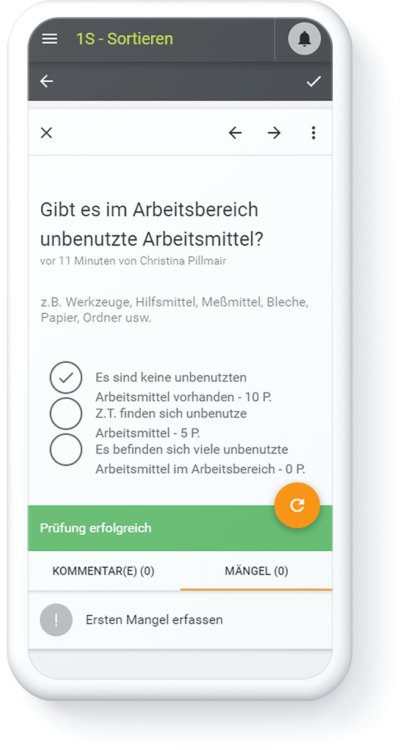
Perform on-site mobile commissioning, even without a network connection
Commissioning rarely takes place where the Wi-Fi signal is strong. Technicians work directly in the Testify app on a tablet or smartphone, even completely offline; as soon as a connection is reestablished, everything syncs automatically. Scanning a QR code or RFID tag on the equipment immediately opens the correct inspection report for that specific item, including its serial number. Measurement values, photos, and comments are recorded right then and there; required fields prevent test points from being skipped. This eliminates the need for post-inspection data entry in the office, where, as experience shows, most details tend to get lost.

Track outstanding issues and defects until acceptance
Virtually no commissioning process is complete on the first try. Deviations are recorded directly in the relevant inspection step as defects—with a photo, severity rating, and category—and are automatically assigned to the responsible person in assembly, engineering, or at the supplier. Each open issue continues as a task with a deadline and assigned responsibility; the defect timeline provides a complete record of when each issue was resolved. This way, by the acceptance date, it’s clear at a glance which items have been completed and which require conditional approval—instead of both sides having to search through email threads.

Generate an acceptance report and evaluate commissioning results
Finally, Testify automatically generates an audit-compliant commissioning report in PDF format, including all measurement values, photos, serial numbers, and digital signatures from the customer and technician. It can be handed over directly to the client and can be retrieved years later for warranty, audit, or maintenance purposes. In the reporting module, project and service managers can see which inspection points are most frequently flagged across all commissioning projects, for which machine types, and from which suppliers. For more in-depth analysis, the data can be transferred directly to Power BI or the existing ERP system.

Commissioning Software: Tailored Features for Every Acceptance Test

QR code & RFID scanner

Offline capability

Photo and video documentation

Warning limits
Signature

PDF export of test reports
What Can Be Achieved with Digital Commissioning Reports
Your free potential discussion

In a 45-minute remote conversation, our industry experts identify the greatest efficiency potential in your testing processes and show you what can be realized with Testify.

The use of Testify has changed the general way we work, we work faster and more efficiently because we have a better overview and all data can be reused elsewhere without media discontinuity!