
Digital Checklists for Inspection, Maintenance, and Audits
Creating a Template Without IT
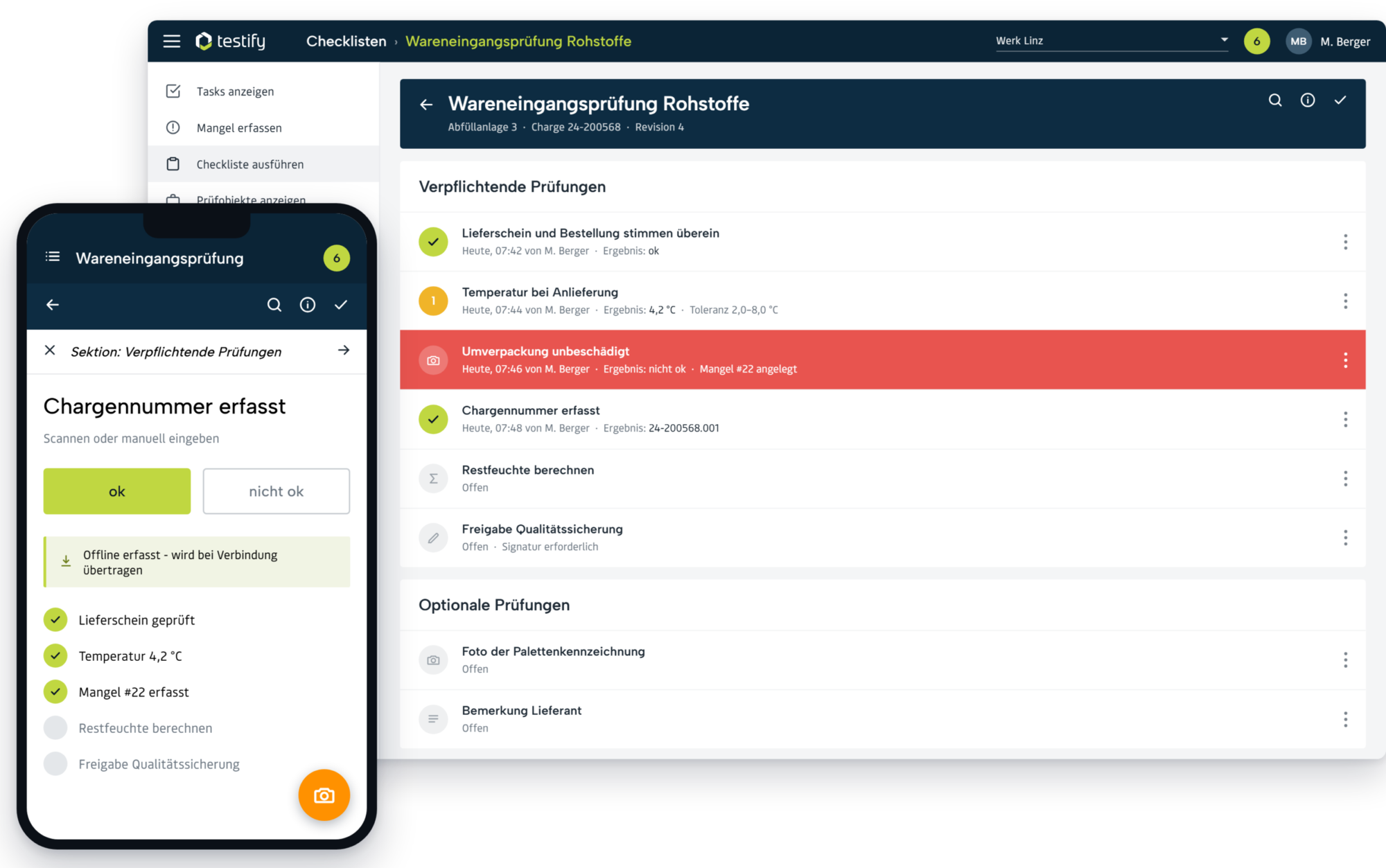
Anyone who distributes inspection plans as Excel files or printed forms struggles with outdated information and lists that no one ever refers to in their day-to-day work. In Testify, each checklist is created once in the Designer: Pages and sections map out the process, while checks represent the individual requirements—as a numerical value, selection, photo, calculation, or signature. Each test is assigned its own type, tolerance limits, and the necessary measuring equipment. Business units maintain this themselves, without the need for a development ticket.


Fill it out on the spot, even without an internet connection
The inspection takes place where the process is happening—at the production line, in the warehouse, or at the customer’s site. By scanning a QR code or using NFC at a machine or workstation, employees can access the correct checklist immediately, rather than having to search for it. Results are recorded with photos and comments, and previous inspections are available for reference. When offline, the app saves data locally and syncs automatically as soon as network coverage is restored—in warehouses and basements, this is the norm, not the exception.

A deviation becomes a defect
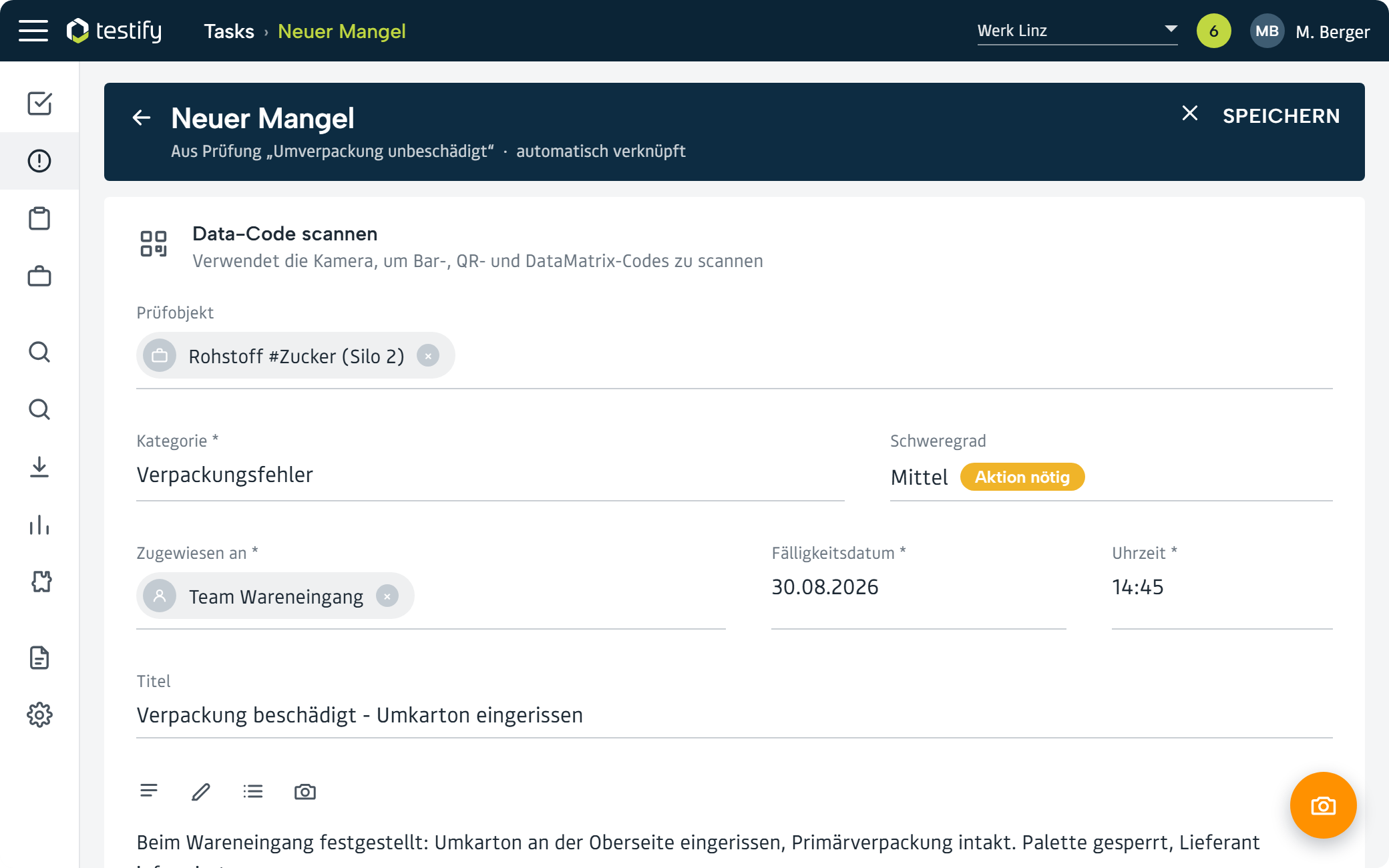
The moment something goes wrong is the most critical part of the entire process—and the one where paper-based systems regularly fail. In Testify, a “not OK” automatically creates a defect entry, linked to the inspection, the item being inspected, and the batch. The category, severity, deadline, and person responsible are immediately determined, and photos can be tagged in the editor. The person responsible is assigned the defect without anyone having to send an email.
Analyze Instead of Filing Away
Paper logs answer the question “Was the inspection performed?”—but not the question “Where are things systematically going wrong?” Because every inspection is recorded in a structured manner in Testify, the analysis is available at the push of a button: first-pass rate, most common defect categories, processing time, and trends across locations. The inspection report is automatically generated as a PDF, and the raw data is fed via the interface into ERP, DMS, or Power BI.

What Makes the Checklist a Form of Documentation

Diverse check types
Pages and Sections
Automatic versioning
Warning limits
Assignment of test equipment to checks
Restriction to users, groups and test objects
Signature
Dynamization

Scoring
What Prospective Buyers Ask Before Making a Decision
What are the advantages of digital quality management software over paper or Excel?
Compared to paper and Excel, digital quality management software offers the advantage of centrally managing all quality processes in a traceable manner. Tasks such as inspections or audits can be planned, carried out, and evaluated digitally, thereby eliminating manual data entry errors. Many quality assurance tasks can be partially automated—for example, through automatic reminders, AI-powered data analysis, or complete audit trails. The result is reduced effort, a lower error rate, and consistently up-to-date quality metrics, which makes it easier to comply with standards such as ISO 9001. Using the Testify MCP Server, you can even analyze quality data by asking your AI assistant a question—such as “Which defects have been open for more than two weeks?”—without having to export data to Excel.
How does Testify ensure data protection and IT security?
Testify relies on high data protection and security standards. Among other things, the solution supports single sign-on (SSO) and multi-factor authentication (MFA) for secure access. All data is stored in certified data centers in Europe and is subject to the GDPR (European General Data Protection Regulation). Regular backups, encryption and a role-based authorization concept also ensure that sensitive data is protected at all times. The same roles and permissions apply when accessing the system via AI assistants through the Testify MCP server: The AI can only see what the respective user is authorized to see in Testify.
Where is the data stored?
Depending on the operating variant selected, the data is stored either in the Testify Shared Cloud (Microsoft Azure) in the Netherlands and Northern Ireland or in a private cloud environment. Strictly speaking, there are three options:
- A) Software as a Service (SaaS) in the Testify Shared Cloud (Microsoft Azure): Data is held in central Testify cloud (MS Azure) (Netherlands and Northern Ireland)
- B) Private cloud: Installation and hosting in a dedicated MS Azure cloud environment (resource group), incl. option for backup plan
- C) MS Azure subscription from customers: Deployment and hosting in the customer’s Azure infrastructure with numerous additional functions, such as Azure AD connection
How long does it take to implement Testify?
A typical Testify project goes live in 2 to 3 months. An experienced team in Linz manages the project in the DACH region, sets up the software, and trains the users. You can start creating your own checklists during the testing phase, even without any programming knowledge. With the Testify MCP Server, the setup process is even faster: your AI assistant generates drafts for digital checklists based on existing documents.
Does Testify work offline?
Yes. The native Testify apps for iOS and Android offer offline functionality: checklists and inspections can be completed without an internet connection, such as in production facilities or on construction sites. As soon as a connection is reestablished, the data is synchronized.
Can I export my data from testify.io again?
Yes. Your data remains accessible at all times: inspection results and defects can be exported as reports and as a consolidated PDF, analyzed using the standard reports in the dashboard, and transferred to third-party systems via the REST API. For independent analysis, a data warehouse connection is also available, allowing you to import your data into your own BI tools.
More digital success stories from our customers:

A look inside the project: How Plasser Australia is digitizing production documentation with Testify.

Exceptional quality and higher productivity at Haidlmair.

60% increase in efficiency with digital shortage management at Plasser American.
Your free potential discussion

In a 45-minute remote conversation, our industry experts identify the greatest efficiency potential in your testing processes and show you what can be realized with Testify.
