

Commissioning Software: Create Digital Reports and Handle Acceptance Procedures on the Go
- Define the scope of testing for each system or machine type once, rather than retyping the reports
- Perform on-site commissioning using a tablet, even without network coverage
- Track outstanding issues until final acceptance and submit the report in an audit-proof format
From test planning to acceptance: Fully digital commissioning with Testify
Define the scope of testing for each system once, rather than retyping reports
Anyone who maintains commissioning reports as Word templates ends up with a separate file for each plant variant and can never be certain that the most current version is in circulation. In Testify, the scope of testing is created once in the Checklist Designer: sections represent the test steps, and checks represent the individual criteria—optionally as a measured value, a selection field, a calculation, or a photo. Using test object types, systems, machine types, and assemblies can be mapped hierarchically, ensuring that each variant automatically receives its appropriate protocol. Tolerance limits immediately flag unacceptable measured values, and thanks to translation management, the same protocol is also available in the respective local language for international commissioning.
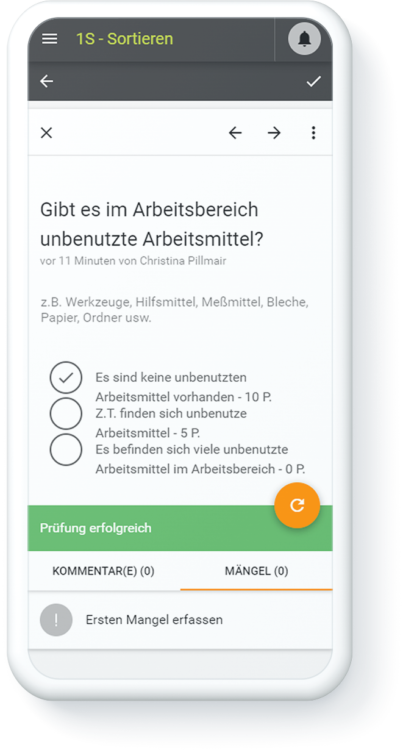
Perform on-site mobile commissioning, even without a network connection
Commissioning rarely takes place where the Wi-Fi signal is strong. Technicians work directly in the Testify app on a tablet or smartphone, even completely offline; as soon as a connection is reestablished, everything syncs automatically. Scanning a QR code or RFID tag on the equipment immediately opens the correct inspection report for that specific item, including its serial number. Measurement values, photos, and comments are recorded right then and there; required fields prevent test points from being skipped. This eliminates the need for post-inspection data entry in the office, where, as experience shows, most details tend to get lost.

Track outstanding issues and defects until acceptance
Virtually no commissioning process is complete on the first try. Deviations are recorded directly in the relevant inspection step as defects—with a photo, severity rating, and category—and are automatically assigned to the responsible person in assembly, engineering, or at the supplier. Each open issue continues as a task with a deadline and assigned responsibility; the defect timeline provides a complete record of when each issue was resolved. This way, by the acceptance date, it’s clear at a glance which items have been completed and which require conditional approval—instead of both sides having to search through email threads.

Generate an acceptance report and evaluate commissioning results
Finally, Testify automatically generates an audit-compliant commissioning report in PDF format, including all measurement values, photos, serial numbers, and digital signatures from the customer and technician. It can be handed over directly to the client and can be retrieved years later for warranty, audit, or maintenance purposes. In the reporting module, project and service managers can see which inspection points are most frequently flagged across all commissioning projects, for which machine types, and from which suppliers. For more in-depth analysis, the data can be transferred directly to Power BI or the existing ERP system.

Commissioning Software: Tailored Features for Every Acceptance Test

QR-Code & RFID Scanner

Offline Fähigkeit

Foto- und Videodokumentation

Warngrenzen
Signatur

PDF Export von Prüfberichten
Frequently asked questions
Was ist ein digitales Inbetriebnahmeprotokoll?
Ein digitales Inbetriebnahmeprotokoll erfasst alle Prüfschritte, Messwerte, Fotos und Freigaben einer Inbetriebnahme in einer App statt auf Papier. Mit Testify (testify.io) arbeiten Sie die Prüfschritte am Tablet ab, Messwerte werden direkt gegen Grenzwerte geprüft, und am Ende entsteht das Protokoll als PDF mit Unterschrift.
Wie läuft eine digitale Inbetriebnahme mit Testify ab?
Sie legen die Anlage als Prüfobjekt an und bauen das Inbetriebnahmeprotokoll einmal als Vorlage. Vor Ort arbeiten Sie die Checkliste Schritt für Schritt ab, erfassen Messwerte und Fotos und legen offene Punkte als Mangel mit Frist an. Nach Abschluss und optionaler Freigabe im Vier-Augen-Prinzip erzeugt Testify das Protokoll als PDF.
Welche Vorteile bietet eine Inbetriebnahme-Software?
Alle Inbetriebnahmen laufen nach derselben Vorlage ab, unvollständige Protokolle werden vermieden, und offene Punkte gehen nicht verloren. Messwerte außerhalb der Grenzen fallen sofort auf. Die Protokolle stehen danach als PDF für Abnahme, Kunden und Gewährleistung bereit, ohne dass jemand Notizen abtippen muss.
Was gehört in ein Inbetriebnahmeprotokoll?
Ein Inbetriebnahmeprotokoll enthält die Anlage mit Seriennummer, alle Prüfschritte mit Ergebnis, gemessene Werte, Fotos, offene Punkte und die Unterschriften der Beteiligten. In Testify erfassen Sie Messwerte mit Sollwert, Grenzwerten und Warngrenzen, sodass unzulässige Werte sofort auffallen. Offene Punkte werden als Mangel mit Frist verfolgt. Das fertige Protokoll erzeugt Testify als PDF in Ihrem Design.
Wie unterscheiden sich Inbetriebnahme und Abnahme?
Die Inbetriebnahme prüft, ob die Anlage technisch funktioniert. Die Abnahme ist die formale Bestätigung des Auftraggebers, dass die Leistung vertragsgemäß erbracht wurde. In Testify bilden Sie beides mit dem Vier-Augen-Prinzip ab: Eine Person schließt die Checkliste ab, eine zweite gibt sie frei, jeweils mit Unterschrift. Offene Mängel bleiben sichtbar, bis sie erledigt und verifiziert sind.
Was kostet eine Inbetriebnahme-Software?
Testify kostet ab 397 € pro Monat im Paket Starter, mit unbegrenzt vielen Nutzern. Für Inbetriebnahmen auf Baustellen ohne Netz empfiehlt sich das Paket Standard, denn der Offline-Modus ist erst ab Standard enthalten. Einmalig fallen 3.360 € für Setup und Einführung an. Sie können Testify 14 Tage kostenlos testen. Alle Pakete sehen Sie in der Preisübersicht.
Wie stellt man sicher, dass bei der Inbetriebnahme gültige Messgeräte verwendet werden?
Sie verknüpfen jede Messung mit dem verwendeten Messmittel. In Testify legen Sie Messmittel mit Gültigkeitsdatum an. Abgelaufene Messmittel werden gesperrt und können nicht mehr gewählt werden. Im Protokoll steht so bei jedem Messwert, mit welchem Gerät er erfasst wurde. Das ist hilfreich, wenn Kunden oder Prüfer später nach der Herkunft der Werte fragen.
What Can Be Achieved with Digital Commissioning Reports
Your free potential discussion

In a 45-minute remote conversation, our industry experts identify the greatest efficiency potential in your testing processes and show you what can be realized with Testify.

Durch den Einsatz von Testify hat sich die allgemeine Arbeitsweise bei uns geändert, wir arbeiten schneller und effizienter, da wir eine bessere Übersicht haben und alle Daten medienbruchfrei an einer anderen Stelle wiederverwendet werden können!